
Real-Time Data Dashboards in Education
Explore how real-time data dashboards are reshaping education, improving decisions, and what leaders must know to design them well.

Quick Answer
Real-time data dashboards in education turn fragmented student, learning, and operational data into live, visual insights that teachers and leaders can act on immediately. They support early-warning systems, adaptive instruction, enrollment and resource planning, and institutional performance tracking. Success depends on clear goals, well-modeled data, governance, privacy, and thoughtful UX. This article outlines benefits, use cases, design principles, implementation steps, and risks, and explains how a partner like VarenyaZ can help institutions build secure, AI-ready dashboards that genuinely support better teaching and strategic decision-making.
In this article
Coverage signals
14 min
Jun 8, 2026
VarenyaZ Editorial Desk, Technical Content Review
Updated Jun 8, 2026
Key Takeaways
- Real-time data dashboards in education are only valuable when they solve clearly defined teaching, learning, or operational problems.
- Dashboards must integrate data from SIS, LMS, assessments, and operations into a trusted, well-modeled layer before visualisation.
- Effective dashboards balance live indicators with trend views, context, and simple, actionable metrics for each role.
- Privacy, security, and ethical data use are non-negotiable, especially when dashboards surface sensitive learner information.
- Change management, training, and shared data definitions matter as much as technology for sustainable adoption.
- AI can enhance dashboards with predictions and recommendations but must remain transparent, explainable, and auditable.
- Start small with high-impact pilots (such as early-warning or course analytics) and iterate based on educator feedback.
- Specialist partners like VarenyaZ can help design, build, and scale secure, AI-ready education dashboards aligned with institutional goals.
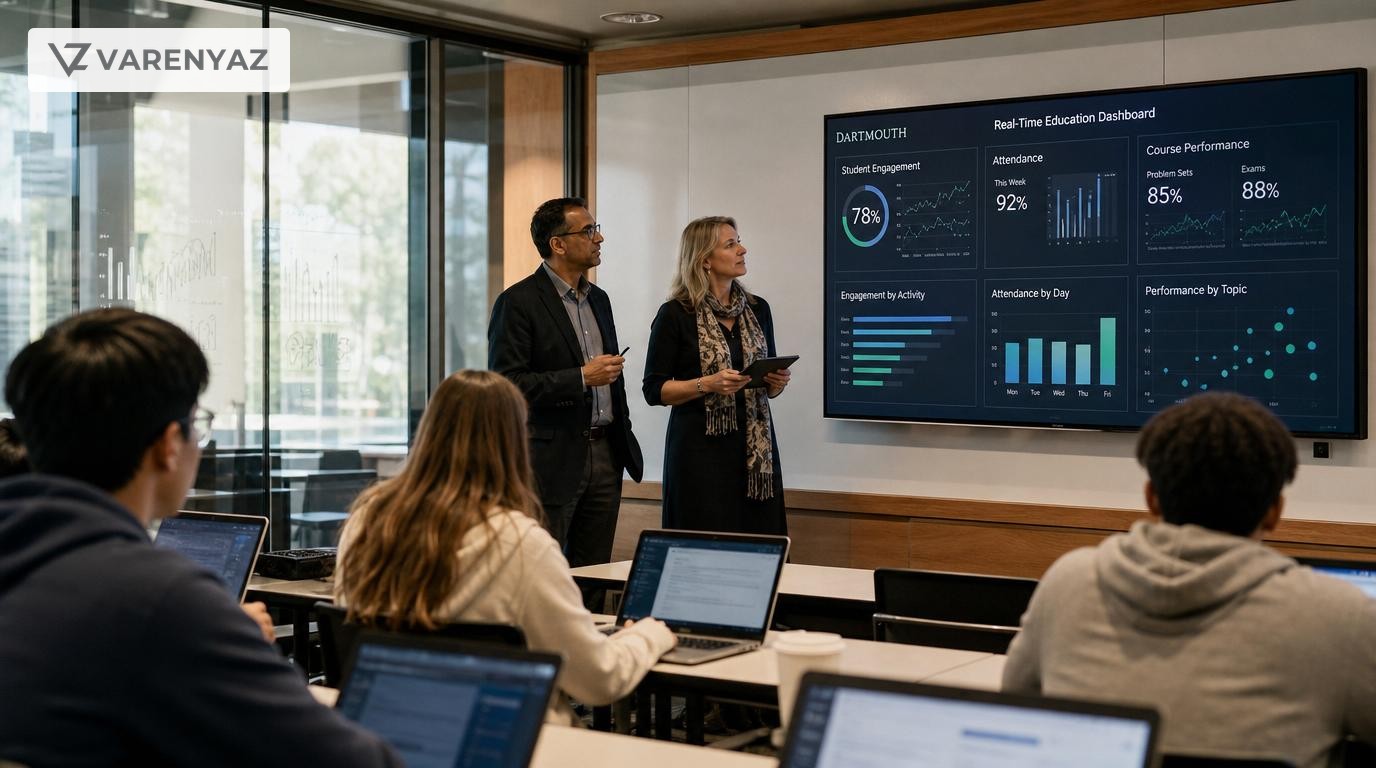
The role of real-time data dashboards in advancing education
Education has never had more data—but most institutions still struggle to turn that data into decisions that actually improve teaching, learning, and operations. Real-time data dashboards promise a way out of this gap.
When built well, dashboards give every stakeholder—teachers, leaders, operations teams, even students—a live view of what is happening right now, not last semester. They turn data from something you review once a year into something you use every day.
This article explores the real role of real-time data dashboards in education, beyond buzzwords. We will look at what they can do, where they usually fail, how to design them responsibly, and how to think about AI-augmented dashboards without over-promising.
What is a real-time data dashboard in education?
In education, a real-time data dashboard is a visual interface that pulls live or near-live data from systems like:
- Student information systems (SIS)
- Learning management systems (LMS)
- Assessment platforms and proctoring tools
- Attendance and timetable systems
- CRM or enrollment systems
- Finance, facilities, and other operational tools
It then presents that data as up-to-date charts, metrics, and alerts tailored to the person viewing it—whether that is a teacher, dean, counselor, or operations lead.
Direct answer: Why real-time dashboards matter in education
Real-time data dashboards in education matter because they bring together live student, course, and institutional data into a single, easy-to-read view that supports immediate action. Instead of waiting weeks for reports, teachers can spot at-risk learners now, leaders can see which programs need attention, and operations teams can plan resources and schedules with current data.
This shift from static reporting to continuous insight is what turns data into a daily decision-making tool instead of an annual compliance chore.
The business value: Why education leaders should care
It is tempting to view dashboards as cosmetic—nice visual layers on top of the same old data. For schools, universities, and edtech businesses, they are far more strategic.
1. Improving student success and retention
Learning analytics research has shown that patterns in attendance, LMS logins, submissions, and grades can predict who is at risk of dropping out or failing courses. When these indicators are surfaced in real time, support teams can intervene earlier.
For example, a student-success dashboard might show:
- Students with sudden drops in LMS activity over the last 7 days
- Courses where assessment scores are trending down week by week
- Students repeatedly missing key milestones or deadlines
Instead of waiting until midterm exams to see who is struggling, advisors can reach out after the first two missed assignments or a noticeable engagement dip.
2. Supporting personalized and adaptive learning
Real-time dashboards help teachers move beyond “whole class" teaching to a more personalized approach. In blended and online settings, dashboards can highlight which students:
- Have already mastered a topic and are ready for extension activities
- Are spending a long time on one concept or quiz and may need extra help
- Prefer certain content formats (video, text, practice questions)
Used carefully, these insights allow instructors to adjust pacing, groupings, and resources more precisely, making adaptive learning models viable even with large cohorts.
3. Strengthening institutional planning and operations
At leadership level, dashboards are powerful strategy tools. University leaders and school chains can use real-time dashboards to track:
- Applications, admissions, and enrollment by program and region
- Retention and graduation rates across cohorts and demographics
- Course fill rates and classroom utilization
- Staffing levels, teaching loads, and overtime risk
- Budget vs. actuals for key projects and departments
Instead of annual reviews that react to last year’s outcomes, leaders get rolling views that enable mid-year adjustments—from targeted recruitment campaigns to reallocating teaching resources.
4. Enabling transparent, shared decision-making
One of the quiet superpowers of dashboards is transparency. When everyone sees the same numbers, conversations change:
- Faculty and leadership can converge on a shared understanding of performance.
- Support teams, marketing, and academics can coordinate around the same indicators.
- Students can gain responsible visibility into their own progress and goals.
This shared “single source of truth” reduces political arguments over data and lets people focus on what to do next.
5. For edtech and training businesses: Differentiated products
If you are building edtech products or large training programs, real-time dashboards are increasingly a core part of the value proposition. Clients expect:
- Live cohort tracking and program health views
- Evidence of impact for outcomes-based contracts
- White-labeled analytics for their own stakeholders
Investing in robust dashboard architecture early can become a competitive advantage rather than an afterthought.
Core use cases for real-time dashboards in education
Not every dashboard is worth building. The most effective initiatives focus on a small number of high-leverage use cases first.
1. Early-warning systems for at-risk students
Early-warning dashboards combine signals like:
- Attendance and tardiness patterns
- LMS logins, time-on-task, and content completion
- Assessment scores and submission timing
- Demographic and background factors (used carefully and ethically)
They surface risk levels for each student and often trigger workflows:
- Advisor outreach tasks
- Automated nudges or reminders
- Flags for counseling or financial aid teams
The key is to frame these dashboards as tools for support and equity, not surveillance or punishment.
2. Course and program performance dashboards
Program leaders and academic deans need live views on how courses and programs are performing across dimensions such as:
- Enrollment, completion, and withdrawal rates
- Grade distributions and pass rates over time
- Student feedback and satisfaction scores
- Alignment between learning outcomes and assessments
Real-time dashboards help them spot courses that are consistently underperforming, faculty who may need support, or curriculum areas where redesign is overdue.
3. Classroom and teacher dashboards
For individual instructors, simple, focused dashboards can replace scattered spreadsheets and LMS reports. A classroom dashboard might show:
- Who has and has not submitted upcoming assignments
- Average quiz performance and common misconceptions
- Students whose engagement has dropped compared to their baseline
- Progress against core competencies or outcomes
Teachers can use this daily or weekly view to plan interventions, adjust lesson plans, or identify students who would benefit from peer support.
4. Operations, resources, and finance
Education is a complex operational business. Real-time dashboards can help operations and finance teams monitor:
- Classroom and lab usage across campuses
- Library and digital resource usage patterns
- Transport, hostel occupancy, and facilities management
- Budget burn, grant utilization, and project milestones
When this operational view is linked to enrollment and academic data, leaders can balance educational quality with sustainable resourcing.
5. Student-facing progress dashboards
Student self-service dashboards can be powerful motivators when done well. They might show:
- Progress toward degree or program completion
- Performance relative to personal goals (not just class averages)
- Recommended next actions or resources
- Key deadlines and milestones
The challenge is to present this data in a supportive, growth-focused way—not as constant comparison or pressure.
Designing effective real-time dashboards: Principles that matter
Technology alone does not make a dashboard useful. Design is where many well-funded projects fail. Consider these principles before building anything.
1. Start with decisions, not with data
Ask each stakeholder group a simple question: “What decisions do you struggle to make today that better, timely data could help with?”
Typical answers include:
- “Which students should I prioritize for outreach this week?” (teachers and advisors)
- “Which programs are underperforming and why?” (academic leaders)
- “Where are we likely to miss our enrollment or revenue targets?” (leadership)
- “How can we schedule rooms and faculty more efficiently?” (operations)
Each answer can seed a targeted dashboard or even a single, well-crafted view.
2. Define shared metrics and data vocabulary
One of the biggest sources of dashboard confusion is inconsistent definitions. “Retention,” “engagement,” and “on track” can mean different things to different teams.
Before you design visuals, agree on:
- Metric definitions (e.g., what counts as an active learner)
- Calculation rules (e.g., how GPA or risk scores are computed)
- Time windows (e.g., 7-day vs. semester-to-date views)
Document these and make them accessible within the dashboard as tooltips or glossary links so users can understand what they are seeing.
3. Design for roles and context
Generic dashboards that try to serve everyone tend to serve no one well. Prioritize role-based experiences:
- Teacher dashboards highlight class-level patterns and individual students who need attention.
- Advisor dashboards focus on student journeys across courses and terms.
- Leadership dashboards provide high-level KPIs, trends, and comparisons.
- Operations dashboards emphasize capacity, utilization, and forecasts.
Each role should have a small set of core views, not dozens of cluttered pages.
4. Combine real-time with trends
“Real-time” without context can be misleading. A small dip in engagement today may not matter if the overall 4-week trend is strong.
Effective dashboards usually balance:
- Live indicators for fast action (today, this week)
- Rolling trends (weeks, months, or terms)
- Historical comparisons (year-on-year or cohort-on-cohort)
This hybrid view helps users distinguish noise from meaningful shifts.
5. Make insights actionable
A dashboard should not just say “Problem here.” It should support “Here is what you could do next.” For example:
- Clickable lists of students behind on assignments, with quick links to message them
- Flags on courses with high withdrawal rates, linking to detail views and past interventions
- Capacity alerts for rooms or slots, suggesting alternative times or locations
Integrating dashboards with workflows—email, messaging, case-management tools—turns passive charts into active tools.
Under the hood: Data architecture for education dashboards
Behind every smooth dashboard is a messy reality of data sources, formats, and policies. Leaders do not need to design the architecture themselves, but understanding the building blocks helps you evaluate proposals and vendors.
Key components of a typical stack
- Data connectors and ingestion: Secure pipelines that pull data from SIS, LMS, assessment tools, CRM, and finance systems via APIs, files, or event streams.
- Data warehouse or lakehouse: A central repository (often in the cloud) where raw data is stored and organized.
- Data transformation and modeling: Processes that clean, join, and reshape data into analytics-ready tables (e.g., “daily student engagement” or “course outcomes”).
- Semantic layer: A translation layer that defines metrics and business logic, ensuring consistent calculations across dashboards.
- BI and visualization tools: The dashboard platform itself, where users view charts, tables, and filters.
- Identity and access management: Role-based and attribute-based controls to ensure users only see data they are permitted to access.
Real-time vs. near-real-time
In education, “real-time” often means “updated frequently enough for the decision at hand,” not necessarily second-by-second streaming. For most use cases:
- 5–15 minutes is enough for engagement and operational monitoring.
- Hourly or daily refreshes are sufficient for program and finance views.
Pushing for full streaming architectures everywhere can add complexity and cost without real benefit. Focus instead on matching refresh rates to decision cycles.
Data governance, privacy, and ethics
Education data involves real people and sensitive histories. Mishandled dashboards can erode trust quickly. Governance and ethics are not optional extras; they are design constraints.
1. Align with regulations and institutional policies
Depending on your region and context, regulations like GDPR in Europe and FERPA in the United States shape how student data can be collected, stored, and shared. Many learning analytics initiatives also follow sector-specific ethical guidelines that emphasize transparency, proportionality, and informed consent.
Leadership should work closely with legal, compliance, and data-protection teams early in the dashboard design process to define:
- What data can be used and for which purposes
- How long data is retained
- Who can access which data and under what conditions
- How students and staff are informed about analytics use
2. Guard against misuse and over-surveillance
Even if dashboards are legally compliant, they can still be misused. Common risks include:
- Publicly ranking teachers or students in shaming ways
- Over-weighting algorithmic risk scores without human context
- Collecting more data than is necessary for the intended support
Institutions should establish principles such as:
- “Dashboards support, not punish.”
- “Human judgment remains central; algorithms provide input, not verdicts.”
- “Students and staff have the right to know and question how their data is used.”
3. Build transparency into the experience
Dashboards themselves can help with transparency by showing:
- What data sources and metrics are being used
- How risk scores or predictions are generated in simple language
- When data was last updated and by whom
This not only builds trust but also helps users interpret the data correctly.
AI and predictive analytics: Extending dashboard value
Artificial intelligence is reshaping how education data is used, especially for prediction and personalization. Real-time dashboards are a natural front-end for AI models—but only if they are designed carefully.
Where AI fits today
Common AI-enhanced capabilities include:
- Predictive risk scoring: Forecasting which students are likely to struggle or disengage, based on historical patterns.
- Next-best-action recommendations: Suggesting helpful interventions, resources, or communications to support a learner.
- Anomaly detection: Flagging unusual drops in performance or engagement that might warrant human attention.
- Natural-language querying: Letting users ask questions like “Which courses saw the biggest improvement in pass rates this term?” in everyday language.
Principles for responsible AI in dashboards
To avoid overreach and maintain trust, consider these design rules:
- Explainability: Give users simple explanations for why a prediction or alert was generated.
- Contestability: Allow educators to override or annotate AI outputs with their professional judgment.
- Bias checks: Regularly test models for biased outcomes across demographics and adjust them accordingly.
- Appropriate impact: Use AI predictions to prioritize support, not to gate access to opportunities without human review.
In practice, the most successful AI features tend to be modest, specific, and well-integrated into existing workflows rather than huge, monolithic systems.
Implementation roadmap: From idea to working dashboards
If you are a founder, CTO, or education leader, you do not need to architect every detail, but you do need a clear, phased plan. A typical roadmap looks like this.
1. Clarify goals and success metrics
Start with 2–3 high-impact goals, such as:
- Reducing dropout in first-year courses by a specific percentage
- Improving on-time completion for a key program
- Reducing room under-utilization across campuses
Define how you will measure success before building dashboards. This clarity helps avoid “analytics sprawl.”
2. Map your data landscape
Work with technical teams or partners to inventory:
- Core systems of record (SIS, LMS, HR, finance, CRM)
- Existing data exports and APIs
- Data quality issues (missing fields, duplicates, inconsistent IDs)
- Regulatory or contractual constraints on data usage
This mapping helps determine whether you need to modernize any systems or adopt a data warehouse before building dashboards.
3. Choose your technology approach
Options range from all-in-one analytics platforms to modular stacks. Your choice will depend on:
- Existing platform investments and vendor lock-in
- Internal data engineering capabilities
- Scalability and performance needs
- Security, residency, and compliance requirements
For many institutions and edtech companies, a cloud data platform plus a modern BI tool strikes a practical balance between power and maintainability.
4. Co-design pilot dashboards with users
Pick one or two pilot use cases, such as an early-warning dashboard for a specific cohort and a program-level performance view. Involve real users from the start:
- Run workshops to sketch ideal screens and workflows.
- Prototype quickly and iterate based on feedback.
- Keep the pilots narrow but deep, focusing on real daily use.
Success stories from these pilots will build momentum for wider rollout.
5. Build robust data pipelines and governance
While pilots can use simpler data flows, scaling requires:
- Automated, monitored data pipelines
- Version-controlled transformation logic
- Clear data ownership and stewardship roles
- Access control policies aligned with roles
Think of this as building the “data infrastructure” that will support many future dashboards and AI projects.
6. Train, support, and iterate
Adoption does not happen automatically. Provide:
- Hands-on training focused on real tasks, not just features
- Office hours or champions for ongoing questions
- Feedback loops to refine dashboards and metrics
Plan to revisit metrics and dashboard layouts regularly as your institution’s strategies and programs evolve.
Risks, tradeoffs, and common pitfalls
Real-time data dashboards offer clear potential, but they are not a silver bullet. Understanding the risks will help you avoid expensive missteps.
1. Data quality undermining trust
If teachers or leaders spot obvious errors in the first dashboards they see, trust can collapse quickly. Fixing this later is much harder than validating data upfront.
Mitigation strategies include:
- Pilot with a smaller, higher-quality data subset
- Run data validation and reconciliation checks
- Show data-quality indicators within the dashboard where appropriate
2. Over-complexity and dashboard fatigue
It is easy to keep adding charts until dashboards become overwhelming. Users then revert to old habits or ignore the tool altogether.
To avoid this:
- Limit each role’s main dashboard to a handful of core views.
- Hide advanced views behind drill-downs.
- Regularly prune rarely used charts and filters.
3. Cultural resistance to data-informed practice
Some educators and leaders may feel that dashboards threaten professional autonomy or oversimplify complex realities. Respecting these concerns is crucial.
Helpful approaches include:
- Positioning dashboards as tools for reflection, not surveillance.
- Highlighting examples where data supported, rather than replaced, expert judgment.
- Involving respected practitioners in design and advocacy.
4. Underestimating ongoing maintenance
Dashboards are not one-off projects. New programs, systems, and policies will require updates. Institutions that treat analytics as a fixed deliverable risk decay and technical debt.
Plan for:
- Ongoing budget for data engineering and analytics work
- Change processes for adding or altering metrics
- Regular refreshes of training and documentation
Geo and context considerations: India, US, UK and beyond
While the core dashboard principles are universal, context matters greatly.
India
In India, rapid growth in higher education and private schooling, combined with national initiatives to improve quality and accountability, make dashboards particularly attractive. Key factors include:
- Diverse technology baselines across urban and rural institutions
- Regulatory frameworks evolving around data and online education
- Strong price sensitivity and need for scalable, cloud-based solutions
Dashboards need to be robust yet cost-effective, with offline-friendly and mobile-first experiences where connectivity is variable.
United States
In the US, many institutions already have legacy analytics platforms. The challenge is often not “starting from zero” but modernizing fragmented systems while complying with FERPA and state-specific regulations.
Dashboards must navigate a complex vendor ecosystem, integrate with established SIS and LMS platforms, and often support outcomes-based funding or performance reporting.
United Kingdom
In the UK, sector-wide initiatives and guidance on learning analytics have encouraged thoughtful, ethical practices. Institutions often focus on:
- Retention and widening participation goals
- Balancing student support with privacy and transparency
- Integrating sector guidelines into local policies and dashboards
Here, governance and stakeholder engagement are as important as technology choices.
Practical next steps for decision-makers
If you are considering real-time dashboards for your institution or edtech product, here is a pragmatic action list:
- Clarify your top three decisions that better, timely data could improve in the next 12–18 months.
- Audit your data sources for availability, quality, and access methods.
- Engage frontline users (teachers, advisors, operations staff) in co-defining metrics and prototype screens.
- Plan a pilot with clear success criteria and limited scope, like a single faculty, program, or learner segment.
- Invest in foundational data work (warehousing, modeling, governance) that will serve future analytics and AI use cases.
- Select or validate your technology stack based on integration needs, scalability, and compliance, not just visual polish.
- Partner where needed with experienced teams who understand both education and modern data practices.
How VarenyaZ can help build education-ready dashboards
Designing and operating real-time data dashboards in education is not just a visualization problem; it is a convergence of product thinking, data engineering, UX, and responsible AI. That is where a specialist partner can be invaluable.
VarenyaZ works with education institutions and edtech companies to:
- Clarify goals and use cases so dashboards map directly to strategic and day-to-day decisions.
- Design role-based experiences for teachers, leaders, operations teams, and students, focusing on clarity and actionability.
- Integrate and model data from SIS, LMS, assessments, and business systems into a secure, well-governed data layer.
- Develop responsive web dashboards that perform well across devices and contexts, including mobile and low-bandwidth environments.
- Embed AI where it adds real value, from risk prediction to natural-language querying, while maintaining transparency and human oversight.
- Support change management with training, documentation, and ongoing iteration based on user feedback.
If you are ready to explore real-time data dashboards for your institution or edtech product, you can start a conversation with the VarenyaZ team at https://varenyaz.com/contact/.
By combining thoughtful web design, robust web development, and careful AI development, VarenyaZ helps education organizations turn scattered data into trustworthy, real-time insights that genuinely advance teaching, learning, and institutional resilience.
Editorial Perspective
Expert Review Notes
"The most effective education dashboards are not about more data, but about better questions; they filter noise so that every chart points a teacher or leader toward a specific, meaningful action."
"If your data pipeline, governance, and consent practices are weak, no dashboard—no matter how beautiful—will be trusted enough to guide decisions that truly affect learners."
"AI-enhanced dashboards work best when their predictions are transparent and contestable, letting educators blend algorithmic insight with professional judgment instead of replacing it."
Frequently Asked Questions
What is a real-time data dashboard in education?
A real-time data dashboard in education is a visual interface that pulls live or near-live data from systems like student information systems, learning management systems, and assessment tools to present up-to-date metrics about students, courses, and institutional performance. It helps educators, leaders, and support teams make faster, better-informed decisions.
What are the main benefits of real-time dashboards for schools and universities?
Key benefits include early identification of at-risk students, more personalized support, improved resource and timetable planning, clearer visibility into program and course performance, and faster feedback loops for policy or curriculum changes. Dashboards turn fragmented data into shared, actionable insights across academic, administrative, and leadership teams.
How can institutions avoid misusing real-time education data?
Institutions should adopt clear governance and ethical guidelines, involve educators and students in defining meaningful metrics, avoid simplistic ranking and public shaming, limit access to sensitive data, and focus on formative insights over surveillance. Transparent communication, opt-in pilots, and regular audits of dashboard usage also help reduce misuse.
What technology stack is typically used to implement education dashboards?
A common stack includes data connectors for systems like SIS and LMS, a data warehouse or lakehouse, transformation and modeling tools, and a BI or dashboard platform. APIs, event streams, and secure identity management enable real-time data flows and role-based access. Many institutions use cloud platforms to scale securely and cost-effectively.
Where does AI fit into real-time education dashboards?
AI can power predictive models for dropout risk, recommend learning resources, flag anomalies, and support natural-language querying of data. However, AI features should be explainable, validated against bias, and framed as decision support for educators, not automated decision-makers. Human oversight and clear documentation remain essential.
How can VarenyaZ support our education dashboard initiative?
VarenyaZ helps design the user experience, integrate and model data from your core systems, build secure and scalable dashboards, and add AI-powered analytics where appropriate. The team works with your stakeholders to prioritize use cases, ensure data privacy and compliance, and deliver dashboards that align with your strategic goals and local context.
Selected References
Further Reading
Related perspectives
Future-Proofing Manufacturing with UI/UX
Future-proofing manufacturing now depends as much on UI/UX design as on machinery. UI UX design in manufacturing reduces errors, speeds training, and makes complex Industry 4.0 systems usable on the shop floor. By mapping critical workflows, simplifying interfaces, and designing data-rich dashboards for real operators, manufacturers can unlock value from MES, IoT, and AI. This article outlines best practices for industrial HMI, mobile apps, and AI copilots, the risks of poor UX, and a practical roadmap. It ends with how VarenyaZ can help design, build, and scale these experiences.
Predictive Analytics for Real Estate Efficiency
Predictive analytics in real estate uses historical and real-time data to forecast demand, pricing, maintenance issues, and operational risks so teams can act before problems arise. It increases operational efficiency by reducing downtime, optimizing occupancy and rental yields, and targeting capital where it matters most. This article outlines core use cases, data and technology requirements, implementation steps, governance and risk considerations, and how leaders can practically start with pilots and scale to portfolio-wide predictive capabilities, often with support from specialized web, data, and AI partners like VarenyaZ.
Legacy Modernization for Real Estate Growth
Legacy modernization in real estate means upgrading core property, leasing, and finance systems so they can support today’s digital, data-driven operations. It involves replacing or refactoring old software, consolidating data, and building a modern, API-first architecture. Done well, it improves decision-making, reduces manual work, and enables AI-driven use cases like dynamic pricing or predictive maintenance. This guide explains the business case, modernization options, risk controls, and practical steps real estate leaders can follow, and how a partner like VarenyaZ helps design and implement modern web, data, and AI solutions.