
What Data You Need Before Building an AI Assistant for Your Business
Learn exactly which business data you need ready, cleaned, and structured before investing in an AI assistant, so it actually answers correctly and delivers ROI.
Guide details
- Type
- how to
- Cluster
- AI for small business
- Reviewed by
- VarenyaZ Editorial Desk
Direct answer
What you need to know
Before building an AI assistant for a modern business, you need three categories of data ready: core reference data (products, services, pricing, locations, policies), process and knowledge data (SOPs, playbooks, FAQs, decision rules, templates), and interaction data (customer conversations, tickets, emails, chat logs). These should be accurate, de-duplicated, access-controlled, and stored in a few reliable systems of record. You also need clear rules for what the assistant is allowed to access and do, plus a plan for keeping this data updated over time.
Key takeaways
- AI assistants are only as good as the business data they can safely access and understand.
- You need clean, current product, customer, policy, and process data before serious AI build work.
- Start with a few reliable systems of record and priority use cases instead of every dataset you own.
- Access control, privacy, and governance decisions are as important as the data content itself.
- Unstructured documents are fine, but they must be organized, searchable, and de-duplicated.
- Plan from day one for how you will keep assistant-relevant data updated and monitored.
- Early involvement from IT, security, and legal reduces later rework and risk.
- A simple data readiness checklist can prevent costly AI assistant failures.
What business data do you really need before building an AI assistant?
Before investing in an AI assistant, you need a clear answer to one question: what business data will it rely on, and is that data ready? The usefulness, accuracy, and safety of AI for business depends far more on your data than on which AI model or vendor you choose.
This guide will help founders, CTOs, operations leaders, and marketing leaders decide whether their data is ready and what to prepare first. You do not need a perfect enterprise data platform to start, but you do need a minimum viable set of reliable data and documents.
We will cover:
- What you are trying to achieve with an AI assistant
- The core data categories you need to think about
- How to evaluate if your current data is fit for purpose
- Practical steps to get data ready without boiling the ocean
- Common mistakes to avoid when connecting data to AI
- When to bring in technical, legal, and security expertise
Start with the business goal: what will the AI assistant actually do?
The business data you need depends entirely on what you want the AI assistant to handle. Without clear use cases, you will either over-collect (increasing risk and cost) or under-collect (leading to useless answers).
Typical AI assistant use cases for modern businesses
Common patterns across small and mid-sized businesses include:
- Customer-facing support
- Answer product or service questions
- Assist with orders, returns, billing queries
- Provide onboarding or troubleshooting guidance
- Internal support and enablement
- Answer HR, IT, and policy questions for employees
- Help sales teams find the right collateral or pricing rules
- Guide new hires through processes and tools
- Operations and workflow assistance
- Summarize tickets, emails, or meeting notes
- Create drafts of responses, proposals, or updates
- Surface relevant SOPs or checklists in context
Each use case implies a specific data footprint. For example:
- A customer support assistant needs product information, policies, and recent order data.
- An internal IT assistant needs knowledge base articles, system access rules, and device standards.
- A sales assistant needs pricing rules, product catalogs, and proposal templates.
Clarify your top 2–3 use cases first. Then you can work backwards to the exact business data required.
The four main categories of data your AI assistant will depend on
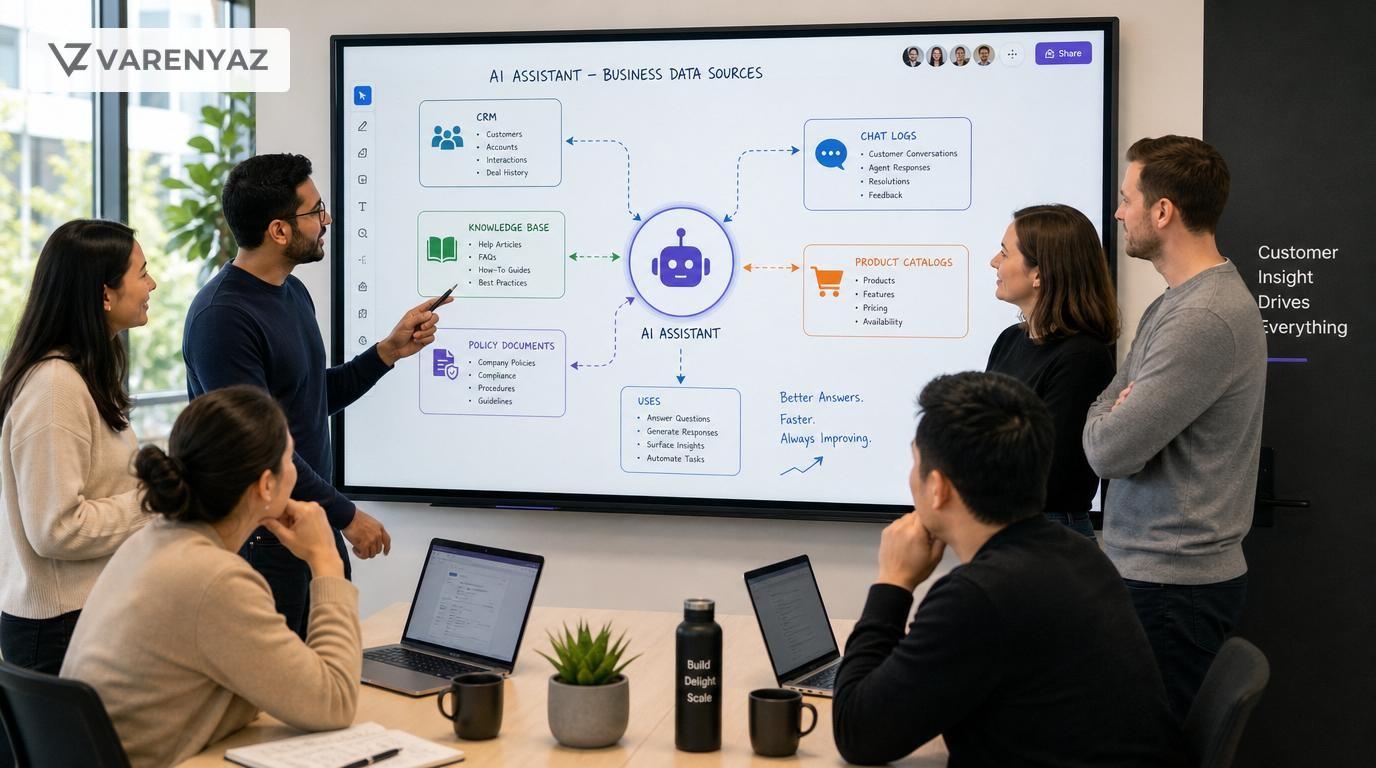
Regardless of your industry, most AI assistants for business rely on four broad categories of data:
- Core reference data: relatively stable facts about your business.
- Knowledge and process data: how you do things and what you promise.
- Interaction and behavioral data: what customers and teams actually say and do.
- Policy, governance, and access data: who can see and do what, under which rules.
1. Core reference data
Core reference data is the backbone of most AI use cases. If this is missing or inconsistent, your assistant will frequently get answers wrong.
Typical examples:
- Product or service catalog
- Names, descriptions, variants, SKUs or IDs
- Key features, specifications, compatibility
- Pricing models or tiers (where relevant)
- Customer and account data
- Customer profiles and key attributes
- Account status, segment, entitlements
- Contract terms or renewal dates (for B2B)
- Locations and logistics
- Office, store, or warehouse locations
- Serviceable regions, time zones, languages
- Shipping methods and delivery options
You do not need every historic record; you need trusted, current sources of truth for what exists today. For most small and mid-sized businesses, this means:
- A CRM or customer system
- An ecommerce or product system
- A finance or billing system
- Possibly an ERP or inventory system
Before building an AI assistant, decide which of these systems is the authoritative source for each data type. This is more important than having a perfect integration architecture.
2. Knowledge and process data
AI assistants shine when they can explain how your business works, not just what you sell. That requires capturing:
- Policies and terms
- Refunds, cancellations, warranty, and guarantees
- Service level agreements (SLAs)
- Privacy, acceptable use, and other key legal terms
- Standard operating procedures (SOPs)
- Step-by-step internal processes (e.g., onboarding a client, escalating a ticket)
- Checklists and runbooks for recurring tasks
- Playbooks and guidance
- Sales plays, objection handling, qualification rules
- Customer service scripts or best practices
- Brand voice and messaging guidelines
- Templates and examples
- Email templates, proposal outlines, report formats
- FAQ documents and internal wikis
Most of this is unstructured (documents, slides, wiki pages). That is fine—modern AI retrieval techniques can work with unstructured text—but it must be:
- Current (not full of obsolete or contradictory versions)
- Centralized (in a knowledge base, shared drive, or wiki)
- Reasonably structured (clear titles, sections, and topics)
3. Interaction and behavioral data
This is data about conversations and activities, such as:
- Customer support tickets and chat logs
- Sales call transcripts or summaries
- Inbound email threads (support, account management)
- Feedback forms, surveys, and reviews
You do not need to connect every historic interaction on day one. However, a representative sample of recent, resolved interactions is extremely valuable for:
- Training the assistant to recognize patterns and intent
- Generating realistic example responses
- Identifying common questions and edge cases
For early pilots, prioritize:
- Ticket/issue fields (e.g., category, resolution, tags)
- Conversation text (where you have consent and rights)
- Outcome metrics (resolved/unresolved, customer satisfaction signals)
Be conscious of privacy and consent obligations—especially for recorded calls or sensitive topics. When in doubt, restrict access or anonymize data.
4. Policy, governance, and access data
This category is often overlooked but is critical for responsible AI deployment. It covers:
- Identity and access rules
- Which users or roles can access which types of data
- Which actions the assistant is allowed to trigger (e.g., create a ticket, issue a refund)
- Security and privacy constraints
- Which data must never be exposed to certain user groups
- Which data must not leave your environment or be used for model training
- Audit and compliance needs
- Which interactions need logging
- What approvals are required for high-impact actions
International guidance, such as the NIST AI Risk Management Framework and the OECD AI Principles, stresses the importance of appropriate data governance and access control when deploying AI systems, including assistants.1,2
Even in small businesses, you should decide early:
- What the assistant can see (data visibility)
- What it can say (answer boundaries)
- What it can do (allowed actions)
How to evaluate your current data before building an AI assistant
Once you understand the categories, you can perform a fast but structured data readiness assessment. This does not require complex tools—spreadsheets and conversations are enough to start.
Step 1: Map use cases to data needs
For each top-priority AI assistant use case:
- Write a one-sentence description (e.g., “Help customers get instant answers about shipping and returns”).
- List the information the assistant must know to perform that task.
- Label each item with where it should live (e.g., product catalog, policy docs).
Example for a customer support assistant:
- Return policy details → Policy documents
- Shipping methods by region → Logistics or ecommerce system
- Order status and tracking → Order management system
- Typical troubleshooting steps → Knowledge base or SOPs
This mapping lets you see which systems are truly required for the first version of your AI assistant.
Step 2: Identify systems of record
Next, for each type of data:
- List all systems, spreadsheets, and tools where it currently lives.
- Choose which one is the system of record—the version you will treat as authoritative going forward.
- Note any obvious conflicts (e.g., pricing differs between site and spreadsheet).
Typical candidate systems of record include:
- CRM for customer and account profiles
- ERP or product information management for product data
- HRIS for employee data
- Knowledge base or wiki for SOPs and policies
If you cannot agree on systems of record, you are not ready to connect data to AI yet. Settle this first; otherwise the assistant will reflect your internal inconsistencies.
Step 3: Assess basic data quality
For each data source you plan to use, ask:
- Completeness: Are required fields often missing?
- Consistency: Do key fields use standard formats and units?
- Uniqueness: Are there duplicate records for the same entity?
- Timeliness: How recently was this data updated?
Focus your attention on high-risk, high-visibility data first, such as:
- Pricing and discounts
- Legal terms and policies
- Customer entitlements and permissions
You do not need to correct every minor issue before you start. But if core facts are wrong, your AI assistant will confidently repeat those mistakes.
Step 4: Inventory unstructured knowledge
Document where your knowledge and process information currently lives:
- Shared drives or cloud storage folders
- Internal wiki or intranet systems
- Project management tools or notebooks
- Individual laptops or private drives (a red flag)
Then evaluate:
- Are there multiple versions of the same policy or playbook?
- Do documents have clear titles and sections?
- Is there a single “golden” folder or space for each department?
A modest reorganization—consolidating to one authoritative version per topic—can dramatically improve AI answer quality without heavy technical work.
Step 5: Clarify privacy, sensitivity, and access
Before exposing data to an AI assistant, you need to know which data:
- Is public or marketing safe (e.g., website content, product descriptions)
- Is internal but low risk (e.g., general SOPs, non-sensitive internal FAQs)
- Is restricted or sensitive (e.g., personal customer data, HR records, financial details)
Mark sensitive data sources, and consider:
- Should this data be used at all in the first version of the assistant?
- If yes, must users authenticate before the assistant can access it?
- Do we need technical controls or contractual terms with AI vendors to protect it?
Global standards and guidance, such as the NIST AI Risk Management Framework and ISO guidelines for data governance, emphasize the importance of defining data sensitivity and access boundaries as part of responsible AI deployment.1,3
The minimum data foundation to build a useful AI assistant
Based on the evaluation above, here is what most modern businesses need at minimum before starting a serious AI assistant project.
1. Clear use cases and answer boundaries
Even though this is not a “dataset,” it is part of your data foundation. Document:
- The top 2–3 things the assistant should do.
- At least a few things it should not do (e.g., provide tax advice, modify contracts).
- Example questions you expect it to handle.
These boundaries determine what data is in scope and protect you from accidental overreach.
2. Clean, current product and service data
For most organizations, this includes:
- A list of active products or services with accurate names and descriptions.
- Key attributes customers or staff ask about (sizes, options, features).
- Basic commercial terms (pricing structure, not necessarily every quote history).
Make sure this data:
- Lives in one or two primary systems of record.
- Is not contradicted by older documents or spreadsheets.
- Is updated by an identifiable owner when things change.
3. Centralized, non-conflicting policies and FAQs
Before connecting policies and FAQs to an AI assistant:
- Consolidate to a single current version of each policy (returns, shipping, warranty, SLAs, privacy).
- Retire obsolete documents or archive them clearly as historical.
- Organize topics clearly (e.g., “Shipping”, “Returns”, “Billing”).
Even a basic assistant can deliver strong value if it reliably answers policy and FAQ questions using well-organized, trusted content.
4. A starter knowledge base of SOPs and playbooks
For internal-facing assistants, prioritize:
- Onboarding guides for new employees.
- Top 10–20 frequently referenced SOPs per department.
- Common troubleshooting steps and runbooks.
Ensure these live where your team expects them (e.g., a shared wiki), and that the AI assistant will be allowed to index that location.
5. Representative interaction examples (optional but powerful)
If you have enough support tickets, chats, or call transcripts, select a:
- Sample of recent, successfully resolved interactions.
- Coverage of your most common question types.
- Set with personally identifiable information redacted or controlled where needed.
This does not need to be a perfect dataset; think of it as realistic context and examples the AI can learn from or retrieve.
6. Defined access rules and data owners
Before building the assistant, write down:
- Which data sources are in scope for version one.
- Which user groups can see which sources (e.g., public site vs. internal CRM fields).
- Who owns each data source and is accountable for its accuracy.
Without clear ownership, your assistant will become stale and untrustworthy over time.
Common mistakes to avoid when preparing data for an AI assistant
Even with good intentions, many businesses fall into similar traps when bringing AI and data together.
Mistake 1: Trying to connect every system on day one
Connecting every CRM, ERP, file share, and SaaS tool at once is tempting but risky. It:
- Increases complexity and implementation time.
- Brings in noisy, low-quality data.
- Makes it harder to debug incorrect answers.
Better approach: Start with the 2–3 most important systems of record for your first use cases. Prove value, then expand.
Mistake 2: Ignoring data quality because “the AI will figure it out”
AI can handle variation in language, but it cannot fix fundamentally wrong or conflicting facts. If you have three different return policies in three PDFs, your assistant will not magically pick the right one.
Better approach: Make small but decisive data quality improvements where they matter most (policies, pricing, entitlements) before deployment.
Mistake 3: Treating sensitive data like any other text
Feeding sensitive data into an AI system without proper controls can create privacy, security, and compliance issues.
Better approach:
- Classify which data is sensitive.
- Exclude or anonymize sensitive data for early pilots.
- When needed, design protected pathways for sensitive access with strong authentication and logging.
Mistake 4: Assuming you need a perfect enterprise data warehouse
Many small and mid-sized businesses delay AI because their data is not yet in a single warehouse or lake. While unified platforms can help, they are not a prerequisite for starting with targeted AI assistants.
Better approach: Use a pragmatic approach: connect a handful of key systems and a well-organized document repository first. Plan for incremental integration over time.
Mistake 5: No plan for ongoing data maintenance
Data changes daily. If no one is responsible for keeping AI-relevant content up to date, answer quality will degrade quickly.
Better approach:
- Assign data owners for each domain (products, policies, SOPs).
- Agree on simple processes for updates (e.g., when policies change, update the knowledge base within 48 hours).
- Periodically review sample AI answers to catch drift.
When to bring in technical, legal, and security help
Not every AI initiative needs a large dedicated team, but some situations absolutely require specialist input.
When to involve technical and data experts
Bring in engineers or data specialists when you:
- Need to integrate multiple systems via APIs or ETL pipelines.
- Have large volumes of unstructured data requiring indexing or transformation.
- Want to implement advanced retrieval techniques (e.g., vector search) across documents.
- Need to design role-based access control at the data or answer level.
Even if you start small, a technical review can prevent avoidable rework, outages, or data exposure.
When to involve legal and compliance
Consult legal or compliance teams when your AI assistant will:
- Process personal data subject to privacy regulations.
- Provide advice or recommendations with legal, financial, or regulatory implications.
- Interact with customers in regulated industries (e.g., finance, health).
International frameworks, like the OECD AI Principles, highlight the need for AI systems that are robust, secure, fair, and respectful of privacy.2 Legal partners can help interpret how this applies in your context.
When to involve security and governance
Involve security leaders when:
- You need to connect internal, non-public systems to an externally hosted AI service.
- You are unsure how the AI provider will store, process, or train on your data.
- You must comply with corporate or industry security standards.
Standards such as ISO/IEC 38505-1 provide high-level guidance on governing data as a strategic asset, which aligns with the need to treat AI training and prompt data carefully.3
Practical, phased approach to preparing data for an AI assistant
To avoid analysis paralysis, you can follow a phased plan that aligns data preparation with business value.
Phase 1: Define and narrow the scope
- Choose 1–2 high-impact, low-risk use cases (e.g., answering basic customer FAQs or internal HR questions).
- Document answer boundaries and excluded topics.
- List only the data sources absolutely needed for these use cases.
Phase 2: Prepare and connect core data
- Agree on systems of record for products, policies, and any needed customer data.
- Clean and consolidate key datasets for those systems.
- Centralize critical policies and FAQs into a single knowledge space.
- Organize documents with clear names and sections.
Phase 3: Implement access controls and governance
- Classify data by sensitivity.
- Decide which user groups the assistant will serve in phase one.
- Set authentication requirements for access to internal or sensitive data.
- Define simple logging and escalation rules for concerning outputs.
Phase 4: Pilot, monitor, and refine
- Launch the assistant to a small group of users.
- Collect feedback and examples of good and bad answers.
- Trace incorrect answers back to data gaps or conflicting documents.
- Update content, clean data, or adjust access rules as needed.
Phase 5: Expand to new use cases and data sources
- Once the pilot is stable, add new use cases with their own data requirements.
- Prioritize integrations that unlock clear business value.
- Continuously revisit data ownership and governance as the footprint grows.
This iterative approach ensures that your AI assistant grows on top of a deliberate, well-governed data foundation instead of a chaotic patchwork.
Checklist: Are you data-ready for an AI assistant?
Use this checklist as a pre-flight review before committing major budget to an AI assistant project.
- You have written, agreed top 2–3 use cases your assistant will handle in phase one.
- You can name the systems of record for products/services, customers, and policies.
- Your core policies (returns, shipping, SLAs, privacy) are current and live in one authoritative place.
- Your product/service catalog is accurate enough that you would be comfortable showing it to every customer.
- At least a basic set of SOPs and FAQs for the chosen use cases is centralized and organized.
- You know which data is sensitive and how it should be protected or excluded.
- Data owners are identified for each major dataset or document collection.
- Technical stakeholders have confirmed that necessary systems can be connected or indexed.
- Legal and security stakeholders have reviewed the scope where personally identifiable or regulated data is involved.
If you can confidently check most of these boxes, you are ready to start building or buying an AI assistant with a reasonable chance of success.
Next steps and how VarenyaZ can help
The best AI assistants do not start with a model; they start with well-chosen use cases and a pragmatic data plan. By clarifying which business data you really need, cleaning and consolidating just enough of it, and putting basic governance in place, you dramatically increase the odds that AI for business will deliver real, measurable value.
If you want structured help turning this guide into a concrete data and AI readiness plan for your organization, you can speak with the VarenyaZ team at https://varenyaz.com/contact/.
References
1. National Institute of Standards and Technology, AI Risk Management Framework.
2. Organisation for Economic Co-operation and Development, OECD Principles on Artificial Intelligence.
3. International Organization for Standardization, ISO/IEC 38505-1:2017 Governance of data – Application of ISO/IEC 38500 to the governance of data.
Practical checklist
- We have written down the primary use cases for our AI assistant and who will use it.
- For each use case, we know which systems and data fields are needed.
- We have defined systems of record for products, customers, pricing, and policies.
- Critical policies and SOPs are centralized, current, and not duplicated in many places.
- We understand which data is sensitive and must be excluded or tightly controlled.
- Our documents are organized into a shared knowledge space with clear topics.
- We have a simple plan for keeping core data and documents up to date.
- Technical, legal, and security stakeholders have reviewed the proposed data scope.
- We are starting with a limited, well-understood dataset for the first AI pilot.
Frequently asked questions
What is the minimum data I need before building an AI assistant for my business?
You need accurate core reference data (products or services, pricing rules, locations), key policies (returns, SLAs, legal disclaimers), and the top workflows or FAQs you want the assistant to handle. This data should live in a few stable systems of record, be up to date, and not contradict itself across documents. You can add deeper history and edge cases later.
Can I build an AI assistant if most of my data is unstructured in documents and emails?
Yes, but you should first organize that content: centralize into a shared location, remove obsolete versions, group documents by topic or team, and ensure file names and headings make sense. Modern AI search and retrieval tools work well with unstructured text, but they still rely on you to decide which documents are authoritative and which are noise.
Do I need to clean all my data before launching an AI assistant?
You do not need perfect data everywhere, but you should clean and verify any data that the assistant will use to answer customers or trigger actions. Focus data cleaning on high-impact domains such as pricing, entitlements, legal terms, and customer identity. For low-risk or exploratory use cases, you can tolerate more imperfections and iterate over time.
What customer data can my AI assistant safely access?
Your assistant should only access customer data that is necessary for the use case, allowed under your privacy policy and applicable regulations, and protected by authentication and role-based access. Sensitive information such as financial, health, or identity data may require additional controls or may be out of scope entirely. Involve legal and security teams when in doubt.
When should I bring in technical experts to help with AI data preparation?
Involve technical experts when you need to connect multiple systems, design secure access controls, migrate or transform large datasets, or comply with strict security and privacy requirements. Non-technical leaders can define use cases and identify key data sources, but engineers and data specialists are best placed to implement integrations, data pipelines, and governance controls.
What if my systems are fragmented across spreadsheets, tools, and emails?
Fragmentation is common. Start by choosing which systems will be your source of truth for each data domain, then consolidate the most critical records there. You do not need to solve every data silo on day one. Prioritize consolidating the data that the AI assistant will reference most often and document where other secondary information still lives.
Sources
Related terms
Related guides
VarenyaZ support
Need help turning this guide into a working product, website, or AI system?
VarenyaZ helps teams plan, design, build, automate, and improve web apps, mobile apps, AI workflows, and digital growth systems.
Talk to VarenyaZ