
How to Estimate the Cost of a Custom Web Application
Learn a practical, step-by-step framework to estimate the cost of a custom web application, compare vendor proposals, and budget confidently for modern digital products.
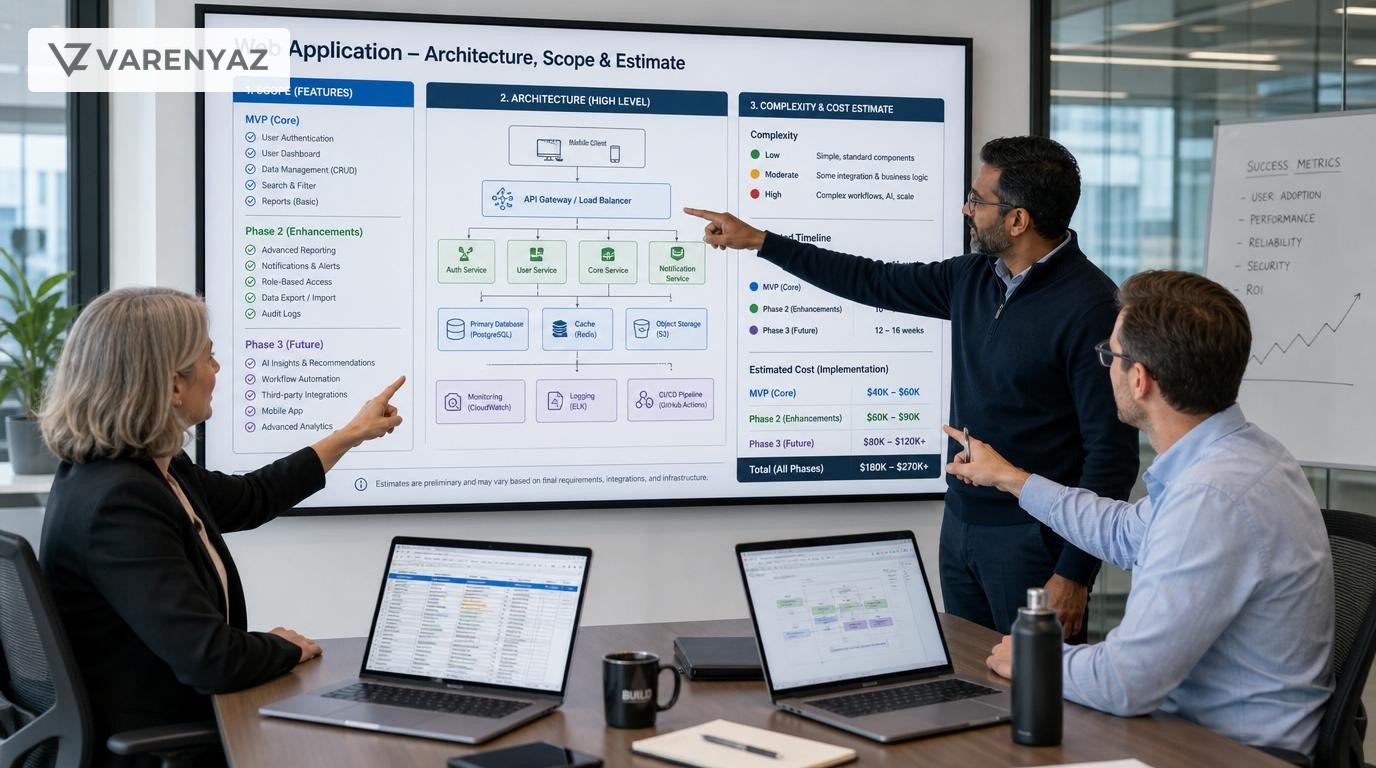
Guide details
- Type
- pillar
- Cluster
- Business planning
- Reviewed by
- VarenyaZ Editorial Desk
Direct answer
What you need to know
To estimate the cost of a custom web application for a modern business, first clarify your business goals and must-have features, then translate them into user journeys and a simple feature list. Next, estimate effort using complexity tiers (simple, moderate, complex) across key components like UI, integrations, data, and security. Layer in team rates, non-development costs (design, PM, QA, DevOps), and ongoing operating expenses such as hosting and support. Finally, build a low-medium-high budget range, validate it with 2–3 vendors, and adjust scope or phases until the budget, risk, and timelines are aligned with your business priorities.
Key takeaways
- Start with clear business outcomes and user journeys before talking about features or budgets.
- Estimate web app cost by combining scope, complexity tiers, team rates, and non-development overhead.
- Technology choices, integrations, and security needs often drive more cost than core features.
- Always budget for ongoing hosting, maintenance, support, and future enhancements, not just build costs.
- Use low-medium-high cost ranges and scenarios instead of a single precise number.
- Compare vendor proposals on assumptions, scope, and risk, not just hourly rates.
- Avoid underestimating discovery, QA, and data migration, which frequently derail budgets.
- Bring in senior technical expertise when scope is complex, regulated, or strategically critical.
What you are really trying to estimate: business value, not just hours
When leaders ask how to estimate the cost of a custom web application for modern businesses, they are usually trying to answer deeper questions:
- Can we afford to build this now? Or should we delay, phase, or reduce scope?
- Will the investment pay back quickly enough? Revenue, efficiency, risk reduction, or differentiation.
- Which vendor or approach is safer? In-house, agency, nearshore, or a hybrid team.
- How do we avoid surprises? Budget blowouts, long delays, or products that don’t meet expectations.
Cost estimation is not about predicting exact hours. It is about creating a structured, shared view of:
- Scope and complexity
- Risks and unknowns
- Investment levels and trade-offs
- Short-term build costs and long-term operating costs
This guide gives you a practical, repeatable way to do that so your leadership, product, and technology teams can make grounded decisions.
Why web application cost estimation matters to modern businesses
Custom web applications are no longer side projects. They are often:
- Revenue engines (ecommerce storefronts, digital products, self-service portals)
- Operational backbones (order management, workflow automation, internal tools)
- Brand experiences (customer portals, partner dashboards, onboarding journeys)
Poor estimation can have real consequences:
- Budget overruns: Extra funding requests mid-year or cancelled initiatives.
- Half-delivered products: Teams cut critical features late to stay within cost.
- Vendor churn: Relationships deteriorate over misaligned expectations.
- Strategic delay: Competitors ship while your project resets scope.
On the other hand, a solid estimation framework helps you:
- Align business and technical stakeholders on what you will build and why.
- Decide whether to build, buy, or integrate.
- Phase delivery for fastest value with controlled risk.
- Compare vendors on a like-for-like basis.
Core components of web application cost
Before you estimate, you need to know what you are adding up. For most modern custom web applications, cost breaks down into four layers:
1. Discovery and product definition
This is the upfront work to reduce ambiguity:
- Stakeholder interviews and workshops
- User and customer research (qualitative, sometimes quantitative)
- Business process and data flow mapping
- Initial UX flows and wireframes
- Technical feasibility and architecture options
Skipping discovery often feels like saving money. In practice, it shifts cost into rework, change requests, and frustration.
2. Design and UX
- Information architecture and navigation
- Interaction and visual design, design systems or component libraries
- Responsive layouts, accessibility considerations
Design affects development effort, but also support load, conversion rates, and customer satisfaction.
3. Engineering and architecture
- Frontend web application, components, and state management
- Backend services, APIs, and business logic
- Database and data modeling
- Integrations with internal and external systems
- Security controls and compliance-related work
This is usually the largest portion of build cost and where complexity multiplies quickly.
4. Quality, operations, and ongoing run costs
- Test strategy, automated and manual testing
- DevOps, CI/CD pipelines, environment management
- Monitoring, logging, alerting, and incident response
- Hosting and cloud infrastructure
- Maintenance, support, and enhancements
These workstreams determine how stable, secure, and maintainable your web application will be over its lifetime.
Step 1: Define business outcomes before features
Start with business planning, not screens or tech stacks. Clear outcomes make cost conversations rational instead of emotional.
Identify your primary business goals
Common goals include:
- Revenue growth: New digital product, pricing model, or sales channel.
- Cost reduction: Automating manual processes or consolidating tools.
- Risk reduction: Better data quality, auditability, or security posture.
- Experience improvement: Faster onboarding, self-service portals, or portals for partners.
Write down 2–3 primary goals and suggest how you will measure them (e.g., reduced handling time, increased conversion, fewer support tickets).
Document constraints
- Time: Hard deadlines (e.g., regulatory dates, contract renewals, seasonal peaks).
- Budget: Initial comfort range, even if rough.
- Compliance: Data residency, sector rules, or security standards you must meet.
- Internal dependencies: Other projects, teams, or system changes.
These constraints will shape what you can realistically achieve in phase one and what can wait.
Step 2: Translate goals into user journeys and scope
Next, define who will use the application and how, in everyday terms. This bridges business language and technical estimation.
Map key user groups
For each group, note:
- Who they are (customers, internal staff, partners, administrators).
- What they want to accomplish.
- How often they will use the system.
Describe top user journeys
Write short, outcome-focused flows, such as:
- "Customer signs up, verifies email, and completes onboarding questionnaire."
- "Operations specialist reviews pending orders, updates statuses, and triggers fulfillment."
- "Marketing manager configures campaigns and views performance dashboards."
Limit this to the top 5–10 journeys for phase one. This keeps the first estimate focused.
Create a lightweight feature list
From those journeys, extract features, then group them:
- Must-have (MVP): Without these, the app cannot deliver core value.
- Nice-to-have: Improve efficiency or experience but are not essential.
- Future: Ideas that can wait for a later phase.
For each feature, add one sentence about its purpose. This is enough detail for preliminary estimation without over-specifying.
Step 3: Assess complexity using tiers instead of guesses
Non-technical stakeholders often struggle when engineers estimate in hours. Instead, align on complexity tiers, then map them to cost with technical support.
Define simple, moderate, and complex features
- Simple: Straightforward CRUD (create, read, update, delete) operations, basic forms, or static content. Limited branching, minimal validation.
- Moderate: More validations, conditional logic, integration with a well-documented API, or multi-step flows.
- Complex: Heavy business rules, custom algorithms, complex data modeling, real-time updates, or integrations with legacy or poorly documented systems.
Ask your technical lead or vendor to classify each feature. Challenge anything marked "simple" if it touches:
- Financial transactions or payments
- Personally identifiable or sensitive data
- Regulated processes
- High-scale, real-time interactions
Consider cross-cutting complexity
Some elements affect the whole application:
- Authentication and authorization: Single sign-on, role-based access, multi-tenant setups.
- Localization: Multiple languages, currencies, and regional formats.
- Offline or mobile-responsive needs: Complex state and caching behavior.
- Security and compliance: Standards such as the OWASP Application Security Verification Standard (ASVS) can increase required controls and testing depth.
These should be estimated separately from individual features because they add effort throughout the system.
Step 4: Decide architecture and integration scope
Architecture and integration choices can dramatically change cost without obviously changing the feature list.
Key architectural decisions
- Monolith vs modular/microservices: Modular systems add flexibility but can increase upfront complexity and DevOps needs.
- Single-page application vs server-rendered: Rich SPAs often require more frontend engineering and state management.
- API-first: Designing APIs for future apps or partners adds initial cost but can create reuse and integration benefits.
- Cloud provider and services: Managed services reduce some development effort but add cloud spend and vendor lock-in considerations.
These decisions should be made with input from architects or senior engineers, especially for systems expected to grow or integrate with many others.
Integration and data migration scope
List all systems the web app must talk to, such as:
- CRM or marketing platforms
- ERP, inventory, or accounting systems
- Payment gateways and billing platforms
- Identity providers (SSO, directories)
- Data warehouses and analytics tools
For each integration, capture:
- Direction of data flow (one-way, two-way)
- Data sensitivity and volume
- Availability and quality of documentation
- Who owns and can support that system internally or externally
Do the same for data migration: what data moves, from where, in what condition, and who is responsible for cleaning, mapping, and validating it.
Step 5: Turn scope and complexity into effort and cost
With scope and complexity mapped, you can begin estimating effort. At this point you should involve a technical lead, architect, or trusted vendor.
Use a structured estimation model
A common approach, aligned with established software project management practices (such as those described in IEEE guidance), is to estimate in relative units first, then map to time and cost.
- Assign each feature a size based on its complexity tier (for example, 1 for simple, 3 for moderate, 5 for complex).
- Sum sizes across features to get a total feature size for your MVP and for the full vision.
- Ask your technical partner, based on their past work, how many of these size units they usually complete per person-month.
- Convert total size into person-months of work, then multiply by blended team rates.
Blended rates account for different roles (senior/junior engineers, designers, QA, PM) and can be used to generate an initial monetary estimate.
Include non-development effort
Beyond coding, make sure you include:
- Product management: Backlog prioritization, stakeholder communication, and scope management.
- UX/UI design: Workshops, wireframes, prototypes, design system work.
- Quality assurance: Test planning, manual tests, automated test development.
- DevOps/Infrastructure: CI/CD pipelines, infrastructure-as-code, environment configuration.
- Security reviews: Threat modeling, secure coding practices, penetration testing where appropriate.
Industry practice and standards-oriented references, such as IEEE software project management guidelines, emphasize planning for these activities explicitly rather than assuming they are "absorbed" into development.
Account for risk and contingency
No estimate is perfect. Identify key uncertainties, such as:
- Unknown integration behavior or API limitations
- Unclear requirements from certain stakeholders
- Legacy data quality issues
- Dependencies on external teams or vendors
Assign a contingency percentage to your estimate based on risk appetite and complexity. More regulated or integration-heavy projects usually warrant higher contingency.
Step 6: Estimate ongoing operating costs (TCO)
Many business cases only look at build cost and ignore the total cost of ownership (TCO). Sustainable planning needs both.
Key ongoing cost categories
- Hosting and infrastructure: Cloud compute, storage, databases, networking, content delivery.
- Monitoring and observability: Log aggregation, performance monitoring, error tracking.
- Licenses and third-party tools: Analytics, authentication, CI/CD, security scanning.
- Maintenance and support: Bug fixes, performance tuning, security patching.
- Enhancements: New features based on user feedback and strategic changes.
For planning purposes, many organizations budget annual run costs as a proportion of initial build investment and adjust over time based on actual usage and change frequency.
Consider scaling scenarios
Discuss with your technical team:
- Expected user growth and traffic patterns.
- Events that may cause spikes (campaigns, launches, seasonal peaks).
- Geographic distribution and latency requirements.
This informs whether you need advanced autoscaling, caching, or content delivery strategies at launch or can introduce them later.
Step 7: Build budget scenarios instead of a single number
Executives often ask for one number, but robust planning benefits from ranges and scenarios that reflect risk and choices.
Create low, medium, and high scenarios
- Low: Conservative scope (only must-haves), lean team, minimal integrations and automation, lower contingency.
- Medium: Must-haves plus a few high-value nice-to-haves, balanced team composition, moderate automation, standard contingency.
- High: Expanded scope, higher UX polish, stronger automation and observability, more robust non-functional work (e.g., additional security measures, multi-region resilience).
For each scenario, document:
- Which features are in and out.
- What quality or resilience trade-offs you are making.
- Expected timeline and team size.
- Estimated build cost and yearly run cost.
Present scenarios to stakeholders alongside business impact, not just price tags.
Plan for phasing and MVP
Split your roadmap into:
- Phase 1 (MVP): Features needed to test core value and achieve initial goals.
- Phase 2: Enhancements and additional user segments once you validate assumptions.
- Phase 3+: Scale, optimization, and strategic extensions.
This lets you commit to a smaller initial investment with clear decision gates for future spend.
Step 8: Compare vendor proposals intelligently
Once you have a baseline understanding of scope and cost drivers, you can request and evaluate proposals more effectively.
What to share with vendors
- Your business goals and success metrics.
- User groups, key journeys, and prioritized feature list.
- Known constraints (timelines, technologies, compliance).
- Integration and data migration details, as far as known.
- Preference for fixed-price, time-and-materials, or hybrid models.
Ask vendors to make assumptions explicit and to highlight areas where they see risk or uncertainty.
How to evaluate and normalize quotes
When proposals arrive, don’t just compare bottom-line amounts. Examine:
- Scope coverage: Does the quote clearly map to your must-have features and journeys?
- Assumptions: What did they assume about integrations, data quality, and non-functional needs?
- Team composition: Seniority mix, role coverage (PM, UX, QA, DevOps).
- Delivery model: Agile iterations, milestones, review points, and change management.
- Quality and security practices: Testing strategy, code review, alignment with recognized secure development practices such as those outlined by OWASP.
Normalize quotes by aligning on scope: if one proposal excludes important items (e.g., UX design or DevOps), adjust your comparison accordingly.
Common mistakes to avoid in web app cost estimation
Several recurring pitfalls cause overruns and frustration. Recognizing them upfront can save time and money.
1. Treating estimation as a one-off number
Estimates should evolve as you learn more. Locking in rigid budgets early, without adjusting for new information, forces compromises on quality or scope.
2. Underestimating discovery and clarification
Skipping or minimizing discovery often leads to poor requirements, misaligned expectations, and rework. Plan tangible time and budget for it.
3. Ignoring non-functional requirements
Performance, security, accessibility, and observability demand real work. If you don’t specify your expectations, vendors may assume a minimal baseline that doesn’t fit your reality.
4. Assuming integrations are simple
Even "standard" APIs can hide:
- Rate limits and throttling
- Unexpected data formats or quality issues
- Authentication complexities
- Versioning and deprecation risks
Always plan for investigation and testing time around integrations.
5. Forgetting about change management and training
If your web application changes how teams work, factor in:
- Training materials and sessions
- Internal communication and adoption campaigns
- Support channels for early users
Otherwise, you risk building a good system that is poorly used.
When to bring in technical and external help
Not every project needs a large advisory layer, but certain signals mean that you should involve senior technical expertise early.
Red flags that justify expert support
- Strategic criticality: The app underpins a core revenue stream or compliance obligation.
- Complex integrations: Multiple legacy or third-party systems, especially without current documentation.
- Security and compliance: Sensitive personal, financial, or health data; sector standards; or strict audit requirements.
- High uncertainty: New business models, untested customer behaviors, or uncertain internal processes.
- Distributed stakeholders: Many departments with competing priorities and opinions.
In these cases, a seasoned architect or product-technology advisor can:
- Facilitate discovery and requirements alignment.
- Design a fit-for-purpose architecture and integration strategy.
- Help standardize vendor briefs and evaluate proposals.
- Challenge unrealistic assumptions on both sides.
If you want structured support to scope and estimate a custom web application tailored to your business, you can talk to the VarenyaZ team at https://varenyaz.com/contact/.
Practical next steps for your organization
To move from theory to action, use this sequence as a lightweight plan:
- Write down your top three business goals for the web application and how you will measure success.
- List your primary user groups and 5–10 key user journeys.
- Create a simple feature backlog, tagged as must-have, nice-to-have, or future, and note any obvious integrations.
- Work with a technical lead to assign complexity tiers to features and to surface cross-cutting concerns like security or performance.
- Draft low, medium, and high budget scenarios with assumptions and phasing, including initial build and annual run costs.
- Prepare a clear brief and share it with 2–3 potential vendors or partners, asking them to articulate assumptions and risks.
- Review proposals with both business and technical stakeholders, normalize scope, and refine your scenarios.
- Decide on your MVP scope, budget boundaries, and governance model for managing change during delivery.
By approaching cost estimation as a structured, collaborative exercise rather than a quick quote request, you build a far more reliable basis for investing in custom web applications that genuinely move your business forward.
Practical checklist
- Business goals and success metrics are explicitly documented.
- Primary user types and top user journeys are mapped.
- Features are labeled as must-have, nice-to-have, or future.
- Each major feature has a complexity tier assigned.
- Known integrations and data migration needs are listed.
- Security, privacy, and compliance requirements are captured.
- Architecture and hosting constraints (e.g., cloud provider) are noted.
- Non-development roles and their estimated involvement are budgeted.
- An ongoing annual run-cost estimate is included.
- At least two vendor estimates have been compared on scope and assumptions.
- Risks and unknowns are reflected as contingency in the budget.
- There is a clear go/no-go decision point with agreed criteria.
Frequently asked questions
What is the typical cost range for a custom web application?
The cost of a custom web application varies widely because it depends on scope, complexity, integrations, and team rates. Simple internal tools can sometimes be built in the low five figures, while complex, customer-facing platforms with rich UX, third-party integrations, and compliance requirements can run into the high five or six figures. A better approach than chasing averages is to define your use cases, classify features as simple, moderate, or complex, and then work with vendors to estimate low, medium, and high budget scenarios.
Which factors have the biggest impact on web app cost?
The biggest cost drivers are usually feature complexity, number and depth of integrations, UX and design quality, security and compliance requirements, and how much of the product must scale for high traffic or large data volumes. Team model (in-house, nearshore, offshore, or hybrid) and project management approach also influence cost, but they often matter less than your functional scope and risk constraints.
How do I budget for ongoing costs after launch?
Post-launch costs typically include hosting and infrastructure, monitoring and incident response, bug fixes, minor enhancements, security updates, and sometimes support for end users or internal teams. A pragmatic rule-of-thumb many organizations use is to allocate an annual run cost of 15–25% of the initial build budget, adjusted for how critical the system is, how often it needs new features, and whether you operate in a regulated or high-risk environment.
How detailed should my requirements be before asking for estimates?
You do not need a full technical specification, but you should define your primary business objectives, key user groups, top user journeys, must-have features, constraints such as timelines and regulatory needs, and any known integrations. This level of clarity allows vendors to give reasonably accurate ranges and highlight assumptions. Overly vague requests like "build a platform like X" tend to produce unreliable estimates and large change orders later.
When should I bring in a technical expert to help with cost estimation?
Bring in senior technical support when your web app involves sensitive data, complex integrations, scaling requirements, or regulatory obligations; when it is strategically critical to revenue or operations; or when stakeholders have conflicting expectations. A seasoned architect or product-technology consultant can translate business needs into practical scope, identify hidden costs and risks, and ensure that vendor quotes are comparable and realistic.
Sources
Related terms
Related guides
VarenyaZ support
Need help turning this guide into a working product, website, or AI system?
VarenyaZ helps teams plan, design, build, automate, and improve web apps, mobile apps, AI workflows, and digital growth systems.
Talk to VarenyaZ