
How to Compare No-Code, Low-Code, and Custom Software for Modern Businesses
A practical guide to compare no-code, low-code, and custom software so modern businesses can choose the right approach for speed, cost, control, and long-term scalability.
Guide details
- Type
- startup
- Cluster
- Startup basics
- Reviewed by
- VarenyaZ Editorial Desk
Direct answer
What you need to know
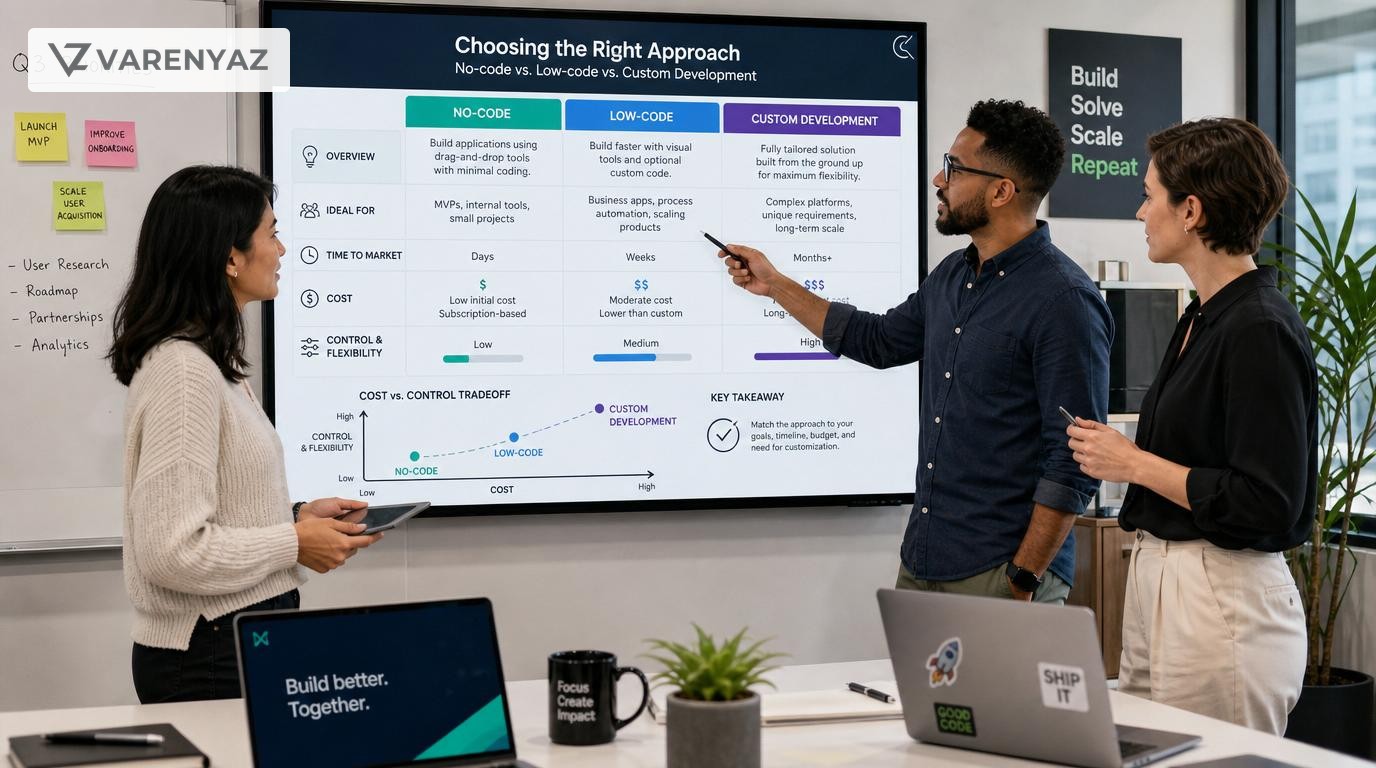
To compare no-code, low-code, and custom software for modern businesses, evaluate each option against your core processes, security needs, compliance, budget, time-to-market, internal skills, and long-term scalability. No-code is fastest for simple, non-critical workflows; low-code balances speed with extensibility; custom software offers maximum control for complex, strategic, or highly regulated systems. Map use cases, assign each to a category, run small pilots, and choose a mixed portfolio rather than a single approach across your entire business.
Key takeaways
- No single approach wins everywhere; use a portfolio of no-code, low-code, and custom solutions.
- No-code is ideal for simple workflows, experiments, and non-critical operations that need speed.
- Low-code suits line-of-business apps where you need faster delivery but still some extensibility.
- Custom software is best for core IP, complex workflows, or strict security and compliance needs.
- Base your decision on business criticality, complexity, data sensitivity, and internal capabilities.
- Always validate platform fit with pilots, governance rules, and clear ownership.
- Plan for data portability and vendor risk before committing to any platform.
- Involve technical and security experts early for integrations, regulated data, and long-term architecture.
What You Are Really Deciding: Speed, Control, and Future Flexibility
When you compare no-code, low-code, and custom software, you are not just choosing tools. You are deciding how your business will trade off speed vs. control vs. long-term flexibility.
For most modern businesses, the right answer is not one approach, but a portfolio that uses all three in different places. This guide helps you design that portfolio in a structured, low-risk way.
We will cover:
- What no-code, low-code, and custom software really mean in business terms
- How each option affects cost, speed, security, and scalability
- A step-by-step framework to match use cases to the right approach
- Common mistakes (like hidden lock-in and tool sprawl) and how to avoid them
- When to bring in a CTO or technical architect for safe, scalable decisions
Definitions: No-Code, Low-Code, and Custom in Plain Business Language
No-Code Software
What it is: Visual, drag-and-drop tools that let non-developers (“citizen developers”) build simple apps, websites, workflows, or dashboards without writing code.
Typical examples of what people build with no-code:
- Landing pages and simple marketing sites
- Internal CRMs or lead trackers
- Basic approval workflows (e.g., vacation requests, content approvals)
- Simple inventory or task tracking tools
Strengths:
- Very fast to build and change – days instead of weeks or months
- Low upfront cost – subscription instead of big development bill
- Accessible to non-technical teams – operations, marketing, support
Limitations:
- Limited customization, especially for complex logic
- Can be hard to integrate deeply with other systems
- Risk of shadow IT: many disconnected tools built by different teams
Low-Code Platforms
What they are: Platforms that combine visual builders with the option to add custom code and reusable components. Designed to accelerate professional or semi-technical development.
Typical examples of what people build with low-code:
- Line-of-business apps (e.g., case management, partner portals)
- More complex approval and routing workflows
- Customer self-service portals integrated with back-office systems
- Departmental apps that require some unique logic
Strengths:
- Faster than pure custom development for many use cases
- More flexible than no-code thanks to extensibility and custom code
- Often include governance, security, and lifecycle tools for IT teams
Limitations:
- Usually requires at least some developer or power-user skills
- Platform-specific knowledge can limit talent pool
- Can still introduce vendor lock-in if not managed carefully
Custom Software Development
What it is: Applications designed and coded from scratch (or near-scratch) by software engineers using general-purpose programming languages and frameworks.
Typical examples of what people build with custom software:
- Core product platforms and customer-facing applications
- Highly specific operational workflows tied to your IP
- Complex integration hubs or data platforms
- Systems in heavily regulated or high-security environments
Strengths:
- Maximum control and flexibility – you can design exactly what you need
- Best suited for complex logic and scale
- More freedom in hosting, performance tuning, and security architecture
Limitations:
- Higher upfront cost (design, build, test, deploy, maintain)
- Slower to ship initial versions vs. no-code/low-code
- Requires ongoing engineering capacity for enhancements and fixes
Why This Decision Matters for Modern Businesses
The way you choose between no-code, low-code, and custom software shapes your:
- Time-to-market: How quickly you can test ideas and respond to customers
- Cost structure: Upfront investment vs. ongoing license and maintenance costs
- Risk profile: Security, compliance, uptime, and vendor lock-in
- Ability to differentiate: Whether your systems can truly support your unique model
- Internal culture: Whether teams feel empowered or blocked by technology
Founders and business leaders often fall into two traps:
- “We’ll do everything no-code, it’s cheap and fast.” This can lead to a fragile stack, data silos, and security blind spots.
- “We custom build everything, we want total control.” This can consume huge budgets and delay product-market fit.
The goal is to use each approach where it is strongest and design for change from the start.
The Core Evaluation Framework: Five Dimensions to Compare
When deciding between no-code, low-code, and custom software for a specific use case, assess it across five dimensions:
1. Business Criticality
Question: If this system goes down for a day, what happens to revenue, customers, and compliance?
- Low criticality: Internal trackers, simple marketing sites, one-off campaigns
- Medium criticality: Departmental workflows, internal portals
- High criticality: Core product, payment flows, regulatory reporting, key customer touchpoints
Implication: The higher the criticality, the more you should lean toward custom or well-governed low-code rather than ad-hoc no-code.
2. Process and Logic Complexity
Question: How many decision branches, rules, and edge cases does this process have today – and will have in two years?
- Simple: Few steps, minimal branching (e.g., single approval)
- Moderate: Multiple roles, several branching paths, some automation
- Complex: Dynamic rules, calculations, dependencies on many external systems
Implication: Simple and moderate processes are good candidates for no-code or low-code. Complex logic and frequent change often justify custom development.
3. Data Sensitivity and Compliance
Question: What type of data will be processed and what regulations apply?
- Low sensitivity: Public marketing content, anonymized data
- Medium sensitivity: Internal business data, non-critical customer operational data
- High sensitivity: Personal data, financial data, health information, regulated records
Implication: The higher the sensitivity and regulatory requirements, the more you must involve security and compliance experts and scrutinize any no-code or low-code platform more deeply, or prefer custom solutions with strong security controls.
4. Integration and Ecosystem Fit
Question: How tightly must this application connect to other systems?
- Minimal integration: Occasional data export or basic API calls
- Moderate integration: Connects to CRM, ERP, or analytics systems regularly
- Deep integration: Real-time sync with multiple systems, complex data flows
Implication: Light integration is often fine for no-code; deeper integration often calls for low-code or custom with an API-first architecture.
5. Time-to-Market and Budget Constraints
Question: How quickly do you need a usable solution and what can you realistically invest?
- Very short timeline: Days to a few weeks; minimal budget
- Moderate timeline: 1–3 months; budget for some development
- Strategic initiative: 3–12 months; strategic budget
Implication: For urgent, low-risk needs, no-code usually wins. For strategic systems, investing in custom or hybrid approaches pays off over time.
Mapping Use Cases: A Practical Portfolio Approach
Rather than asking “Which approach should our company use?”, ask:
“Which approach should we use for this specific use case given our constraints and strategy?”
Here is a simple way to map your portfolio.
Step 1: Inventory Key Use Cases
List the software needs across your business:
- Customer-facing: signup flows, product usage, self-service, billing, support
- Internal operations: order management, workflows, inventory, HR processes
- Analytics and reporting: dashboards, data collection, KPI tracking
- Partner and vendor interfaces: portals, data exchange, SLAs
For each, capture a one-sentence description and the main users.
Step 2: Classify Each Use Case with the Five Dimensions
For each use case, rate it on the five dimensions:
- Business criticality: low / medium / high
- Process complexity: simple / moderate / complex
- Data sensitivity: low / medium / high
- Integration depth: minimal / moderate / deep
- Time and budget: urgent / moderate / strategic
You can do this in a simple spreadsheet for clarity.
Step 3: Apply a Simple Decision Heuristic
Use this heuristic as a starting point:
- No-code likely fit: Low–medium criticality, simple–moderate complexity, low–medium sensitivity, minimal integration, urgent or experimental
- Low-code likely fit: Medium criticality, moderate complexity, medium sensitivity, moderate integration, moderate timeline
- Custom likely fit: High criticality, complex logic, high sensitivity, deep integration, strategic timeline
This is not a strict rule, but it helps you focus your evaluation.
Step 4: Decide Where to Mix Approaches
Many real-world solutions benefit from combining them:
- Custom core + no-code/low-code edges: Build your core product or critical workflows as custom software, and use no-code or low-code for peripheral dashboards, forms, and internal tools.
- No-code MVP, custom V1: Use no-code to validate demand and workflows, then transition to a custom build once value and requirements are clear.
- Low-code integration layer: Use a low-code platform to orchestrate workflows between systems, even when some are custom-built.
Detailed Comparison: Benefits, Tradeoffs, and When to Use Which
No-Code: Best For Speed and Experiments
Use no-code when:
- You need to test or launch something simple very quickly.
- The process is not yet stable, and you expect many iterations.
- The impact of failure is low and there are easy workarounds.
- Business teams are willing to own configuration and content.
Business advantages:
- Empowers non-technical teams; reduces dependency on engineering.
- Excellent for prototypes, pilots, landing pages, and internal tools.
- Good fit for early-stage startups with limited developer capacity.
Risks and tradeoffs:
- Can be hard to enforce consistent design, data models, and security.
- Long-term scaling might require migrating off the platform.
- Configuration complexity can become its own form of technical debt.
Low-Code: Best for Business Apps with Some Complexity
Use low-code when:
- You need faster delivery than custom, but more flexibility than pure no-code.
- You are building line-of-business or departmental apps with evolving logic.
- IT wants enough control to manage security, integrations, and lifecycle.
Business advantages:
- Speeds up delivery of internal apps and workflows.
- Enables collaboration between business users and developers.
- Often includes governance, audit, and integration tooling suitable for larger organizations.
Risks and tradeoffs:
- Over-reliance on platform-specific features can increase vendor lock-in.
- License costs can grow as usage and user count increase.
- Underestimating the need for developer involvement can lead to poorly engineered solutions.
Custom Software: Best for Strategic, Complex, or Regulated Systems
Use custom software when:
- The system underpins your core product or unique value.
- You have complex processes and business rules.
- You operate in regulated industries with strict security and compliance requirements.
- You need freedom in hosting, performance tuning, and scaling.
Business advantages:
- Full control over architecture, logic, and UX.
- Easier to build an API-first ecosystem for future integrations.
- Can better align with secure software development frameworks and standards over time.
Risks and tradeoffs:
- Higher upfront investment and longer initial delivery time.
- Requires ongoing engineering team or a committed external partner.
- Poor design decisions can create long-term technical debt.
Cost, Risk, and ROI: How to Compare Total Cost of Ownership
When you compare costs, look beyond subscription fees or initial development quotes. Consider the total cost of ownership (TCO) over 3–5 years:
Cost Components to Consider
- Licensing and hosting: Platform subscriptions, hosting, storage, bandwidth.
- Build and configuration: Time spent by staff or vendors creating the solution.
- Maintenance and enhancements: Ongoing changes, bug fixes, and support.
- Training and onboarding: Time for teams to learn tools and processes.
- Migration and exit: Cost of moving data or re-building if you switch platforms.
Risk Components to Consider
- Security and compliance risk: Alignment with secure development and verification practices, especially if you handle sensitive data.
- Vendor risk: Financial health of platform vendors, roadmap alignment, data export options.
- Operational risk: Dependence on a few individuals who understand how your tools are configured.
Comparing ROI
To compare ROI, answer:
- How much faster can we reach our business goal with this option?
- How much revenue, savings, or risk reduction does it unlock?
- How will this choice impact our flexibility in 12–36 months?
A no-code option that gets you into the market three months earlier can justify substantial subscription cost. A custom system that enables a unique customer experience or automation advantage can pay back its cost many times over.
Implementation Steps: From Concept to Decision
Step 1: Clarify the Business Outcome
Before picking any technology, define:
- Problem: What business issue are we solving?
- Users: Who will use or be impacted by this system?
- Success metrics: Time saved, revenue gained, errors reduced, NPS improvement?
Keep this to one page. It will anchor all further decisions.
Step 2: Capture Constraints and Requirements
Identify key constraints:
- Timeline: When must the first version be live?
- Budget: What can you invest now and annually?
- Compliance: Any regulatory or audit obligations?
- Data: What data will be stored, processed, or transmitted?
At this stage, founders and business leaders should involve whoever is responsible for security or compliance, especially when handling customer, financial, or health data.
Step 3: Shortlist Options Across All Three Approaches
For each important use case, identify at least:
- One no-code option (if applicable)
- One low-code option
- One custom path (even conceptually, e.g., "build with our preferred stack")
For each option, gather:
- Expected time-to-first-usable version
- Ballpark cost for year one and years two–three
- Fit with your data, integration, and compliance needs
- Vendor maturity (for platforms) and team capability (for custom)
Step 4: Run a Time-Boxed Pilot or Proof of Concept
Instead of debating theoretically, allocate a short pilot window (2–6 weeks) to test your shortlisted options.
During the pilot:
- Build a narrow slice of the use case (not the full solution).
- Integrate with at least one real system, if integration is important.
- Have actual end users interact with the prototype and give feedback.
Evaluate:
- How quickly can changes be made?
- Does the platform or approach support your core requirements?
- How comfortable are your teams using or extending it?
Step 5: Decide the Primary Approach and Governance
Choose the approach that best balances your constraints and long-term goals. Then define governance:
- Ownership: Who owns this solution (business and technical)?
- Change management: How are changes requested, approved, and documented?
- Security and compliance checks: How do you ensure ongoing alignment with your policies and relevant standards?
Even for no-code apps, treat them as part of your official technology portfolio, not throwaway experiments, once they support real operations.
Step 6: Plan for Integration and Portability
Before you scale adoption, plan for:
- Integrations: How this solution will connect to your CRM, ERP, analytics, and other systems (often via APIs).
- Data portability: How you would export all data and logic if you needed to migrate.
- Documentation: How the configuration and business rules will be documented so you are not dependent on one person.
Common Mistakes to Avoid
Mistake 1: Letting Shadow IT Proliferate
If every team spins up its own no-code tools without oversight, you end up with:
- Conflicting versions of the truth (e.g., multiple customer lists)
- Inconsistent security and access controls
- Unclear ownership when something breaks
How to avoid: Establish basic guidelines and a simple approval process for new tools, especially those touching customer data or money.
Mistake 2: Underestimating Security and Compliance
Even on no-code and low-code platforms, you are still responsible for protecting customer and business data.
How to avoid:
- Involve security or engineering leads in platform selection and design.
- Align practices with recognized security frameworks where applicable.
- Use strong access controls, encryption options, and logging.
Mistake 3: Overbuilding Custom Software Too Early
Building a complex custom system before you understand user needs often leads to:
- Long delays in finding product-market fit
- Expensive rework when requirements change
- Frustration between business and engineering teams
How to avoid: Use no-code or low-code for early validation when possible, then solidify requirements before investing in a large custom build.
Mistake 4: Ignoring Vendor Lock-In and Exit Strategy
Moving away from a deeply embedded no-code or low-code platform later can be costly.
How to avoid:
- Check export capabilities for data and configurations before committing.
- Keep core business logic documented outside the platform where possible.
- Design integrations so that some components can be swapped without full rewrites.
Mistake 5: Not Investing in Governance for Low-Code
Low-code can become a tangled set of workflows if not governed.
How to avoid:
- Define who can build, approve, and deploy new low-code apps.
- Maintain a central registry of applications, owners, and dependencies.
- Apply version control and testing practices where supported.
When to Bring in Technical and Security Experts
Even if you lean heavily on no-code and low-code, there are moments when bringing in a CTO, fractional CTO, technical architect, or security specialist is essential.
Bring in Technical Help When:
- You are designing systems that handle sensitive or regulated data.
- You need deep integrations with legacy or mission-critical systems.
- You expect significant scale (e.g., large user volumes, high transaction rates).
- You are choosing a platform that will become strategic for many teams.
- You are not sure how to structure an API-first architecture for future flexibility.
Bring in Security and Compliance Help When:
- You operate in regulated industries (e.g., financial services, healthcare).
- Your systems handle personal, financial, or health data.
- You need to demonstrate secure development practices to customers, partners, or auditors.
Technical experts can help you:
- Design an architecture that combines no-code, low-code, and custom safely.
- Evaluate vendors and technology stacks against your risk appetite.
- Create governance and documentation that survive staff changes.
Designing Your Long-Term Mix: A Practical Template
Here is a practical way to think about your long-term mix:
- 10–30% No-Code: Experiments, campaigns, small internal tools. Owned primarily by business teams within a light governance framework.
- 30–50% Low-Code: Departmental and workflow-heavy apps, integration orchestration, and internal portals. Co-owned by business and IT.
- 20–40% Custom Software: Core product, critical systems, complex integration hubs, and high-compliance areas. Owned by product and engineering with strong security oversight.
Your exact percentages will differ, but this mindset encourages you to:
- Use no-code where speed and learning matter most.
- Use low-code to scale repeatable, but not deeply unique, processes.
- Use custom software where differentiation, complexity, or control truly matter.
Next Steps: Turning This Guide into a Decision
To move from reading to action, do the following within the next month:
- Choose one priority initiative (e.g., new customer portal, operations automation).
- Apply the five-dimension framework to that initiative and classify it.
- List at least three options across no-code, low-code, and custom.
- Run a small, time-boxed pilot for the top one or two candidates.
- Decide your primary approach and define ownership and governance.
If you want structured help designing a balanced portfolio of no-code, low-code, and custom solutions aligned with your roadmap, you can talk to VarenyaZ at https://varenyaz.com/contact/.
Practical checklist
- Have we clearly defined the business problem and success metrics?
- Did we classify use cases by complexity, criticality, and data sensitivity?
- Have we evaluated at least one no-code, one low-code, and one custom option?
- Do we understand licensing, hosting, and scaling costs for each option?
- Have security and compliance requirements been reviewed by an expert?
- Is there a clear integration and data portability plan?
- Do we have governance and ownership defined for each platform or stack?
- Have we run a pilot or proof of concept before committing long term?
Frequently asked questions
When should a startup choose no-code over custom software?
Choose no-code when you need to validate an idea quickly, build internal tools or simple workflows, and do not have complex logic, heavy integrations, or strict security and compliance constraints. It is well suited for prototypes, landing pages, simple CRMs, and lightweight operational processes. As soon as a workflow becomes business-critical, complex, or highly customized, reassess whether low-code or custom development is more appropriate.
How is low-code different from no-code in practice?
Low-code platforms provide visual builders like no-code, but they also allow developers to inject custom code, create reusable components, and build more complex logic and integrations. In practice, low-code often requires at least some developer involvement to do things well, while no-code aims to keep most work in the hands of non-technical builders. Low-code generally offers better extensibility and governance options than consumer-focused no-code tools.
Is custom software always more expensive than no-code and low-code?
Custom software typically requires higher upfront investment in design, development, and maintenance. However, over a multi-year horizon, custom solutions can be more cost-effective when they support high-value, differentiated processes, or when platform license fees and workarounds on no-code or low-code tools start to add up. The right question is not just initial cost, but total cost of ownership and business value over time.
Can I mix no-code, low-code, and custom software in one business?
Yes, and for most modern businesses that is the best approach. Use no-code for quick experiments and lightweight operations, low-code for departmental or workflow-heavy apps that need some customization, and custom software for strategic systems and complex integration hubs. Integrate them via APIs and shared data standards, and put governance in place so your portfolio stays maintainable over time.
What are the main risks of relying heavily on no-code or low-code platforms?
Key risks include vendor lock-in, limited customization for complex edge cases, performance or scaling constraints, and security or compliance gaps if governance is weak. You may also face challenges integrating deeply with legacy systems or exporting data cleanly if you decide to migrate. These risks can be mitigated by assessing vendors thoroughly, designing integrations via APIs, planning for data portability, and documenting your configuration and business logic.
When should I bring in a CTO or technical architect to help with this decision?
Bring in a CTO, fractional CTO, or technical architect when your use case touches sensitive data, regulated processes, complex integrations, or systems that are strategically important to your business model. They can help you assess architecture, security, scalability, and vendor risk, and design a portfolio where no-code, low-code, and custom solutions work together instead of creating a fragmented tool landscape.
Sources
Related terms
Related guides
VarenyaZ support
Need help turning this guide into a working product, website, or AI system?
VarenyaZ helps teams plan, design, build, automate, and improve web apps, mobile apps, AI workflows, and digital growth systems.
Talk to VarenyaZ